
Practice Management Platform for Helpbox Accountancy
A slow internal system rebuilt into the platform a UK accountancy firm runs on: every client, every service, every deadline, and now the AI that triages its inbox.
A system that had become the ceiling
Helpbox is an accountancy and bookkeeping firm with hundreds of small-business clients, each on a different mix of services: limited company accounts, VAT returns, self-assessment, payroll, bookkeeping. When we first spoke, the firm ran on a system built for a smaller version of itself. It was slow, and it had quietly become the limit on how many clients the team could take on.
The first job was not to add features. It was to document how the existing system actually worked, then rebuild it on a data structure that could scale, in PHP and JavaScript, fast enough that the team stopped waiting on it.
That rebuild bought the headroom for everything that followed. Once the platform was no longer the bottleneck, the conversation moved from keeping up to changing how the firm worked.
Every accounting service is a different workflow
A VAT return, a set of year-end accounts and a self-assessment do not move through a practice the same way. Each has its own steps, its own hand-offs between people, and its own filing deadline. A client on three services is in three workflows at once.
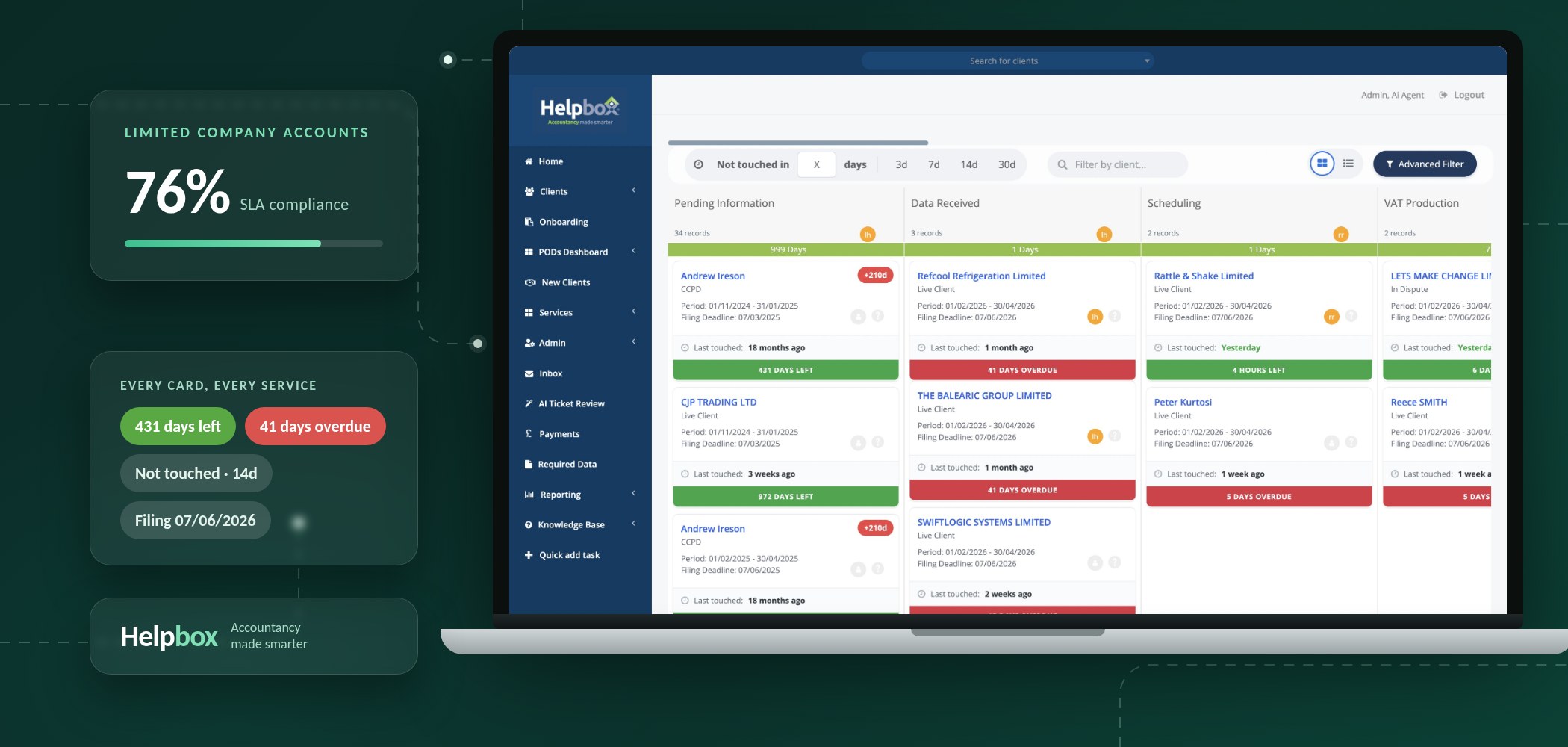
We built the workflow engine so that services are created at will, each with its own customised process. Staff are assigned to a client, and comments, documents and tags travel with the job as it moves across the board. A kanban view shows every client on every service for the accounting period, filterable by pod, service and risk.
signals Days to filing deadline · Days overdue · Last touched · Pod owner
per client Comments · Documents · Tags · Required data · Payments
The board is not decoration. “Not touched in 14 days” and “days overdue” are the two numbers a practice manager actually needs, and they sit on every card.
Notifications close the loop: automated messages to staff or clients at any step, by email or text, so chasing for records stops being a job someone has to remember.
Compliance is part of onboarding, not a form afterwards
An accountancy firm is a regulated business. Every new client needs anti-money-laundering due diligence under the Money Laundering Regulations, identity verification, and a documented risk assessment a supervisor can inspect.
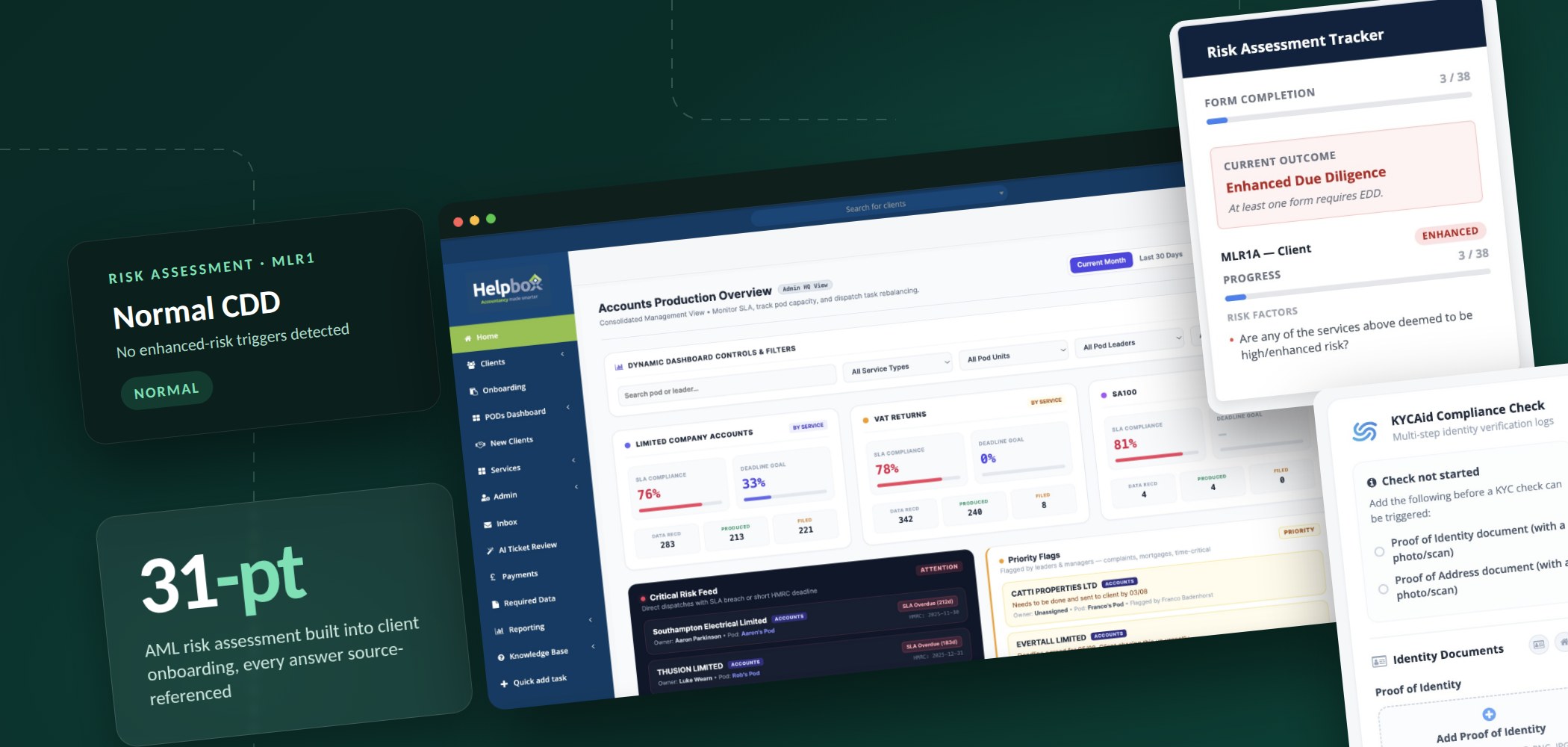
We built this into the platform rather than beside it. Onboarding walks the team through a structured MLR1 risk assessment; each answer is recorded with its source; and the tracker computes the outcome live, escalating to enhanced due diligence the moment a trigger is met. Identity and address documents feed a KYC check from the same screen.
Risk assessments in a Word template, saved to a client folder, with the outcome decided by whoever filled it in.
A 31-point assessment recorded against the client record, source referenced per answer, outcome computed and auditable, KYC triggered from the same screen.
Management information that answers the question being asked
A platform that runs every client interaction generates a lot of data. The first version of reporting let the team build and filter reports and export them to Excel. That was useful, and it was not enough: it told you what had happened, one report at a time.
The management information layer that followed puts the whole practice on one screen. SLA compliance per service; data received against produced against filed; a critical risk feed of clients with an SLA breach or a short HMRC deadline; and priority flags raised by pod leaders. Each figure drills down to the clients behind it.
Pods, the firm’s small client teams, are first-class in the data model, so capacity and rebalancing decisions are made from the same numbers the team is measured on.
The inbox was the next bottleneck
Once production was under control, the constraint moved to support. Client emails arrive in Freshdesk in the hundreds; most are routine and every one needs a considered reply from someone who knows the account. We built an AI triage layer: tickets are pulled from Freshdesk, matched to the client record, and an AI drafts a reply and a proposed action plan from a fixed set of actions the firm actually takes. Nothing is sent without a human. Reviewers see the thread, the draft and the plan on one screen and approve, edit, or leave it for a person.
Every ticket read cold, the client looked up by hand, and the reply written from scratch.
Draft and action plan ready for review with a confidence score; high-confidence routine tickets processed automatically, everything else waits for a human.
There is a kill switch, and the thresholds are the firm’s to set. Automation in a regulated practice earns trust one reviewed ticket at a time.
Integrations that remove the re-keying
A practice’s data lives in HMRC, Companies House and the client’s bank as much as in its own system. We integrated the platform with each, so filing status, company records and transaction data arrive where the work happens instead of being copied in.
Payments are handled in-platform, required-data requests reach clients through the same notification channels, and the knowledge base sits alongside the work rather than in a separate wiki.
None of this is visible to a client. What they see is a firm that asks for things once and always knows where their filing stands.
Where it stands
Helpbox runs on the platform day to day, and we hold a continuous development contract: a scheduled flow of specified, estimated jobs, each communicated to the team as it goes live.
In the firm’s own words: a full restructuring of how it manages clients and tasks, creating efficiencies that did not exist before, with the next phase to do the same for customer service. The AI triage layer is that phase.
Your firm has outgrown its software.
We build the systems regulated firms run on: rebuild what is slow, then add the workflow, compliance and AI layers that let a team take on more clients without hiring ahead of them.
.avif)